Author: admin

  • LOOI AI Desktop Companion Robot: Features, Everyday Uses, and What to Know Before Choosing One

    LOOI AI Desktop Companion Robot: Features, Everyday Uses, and What to Know Before Choosing One

    Introduction

    Artificial intelligence is gradually becoming part of everyday technology, moving beyond traditional websites, search engines, and smartphone applications into devices designed to interact with people in more natural ways. From voice-controlled assistants to smart home systems, these technologies are changing how people access information, manage tasks, and interact with digital services. AI desktop companions represent another development in this space, combining conversational software with a physical device intended to sit on a desk.

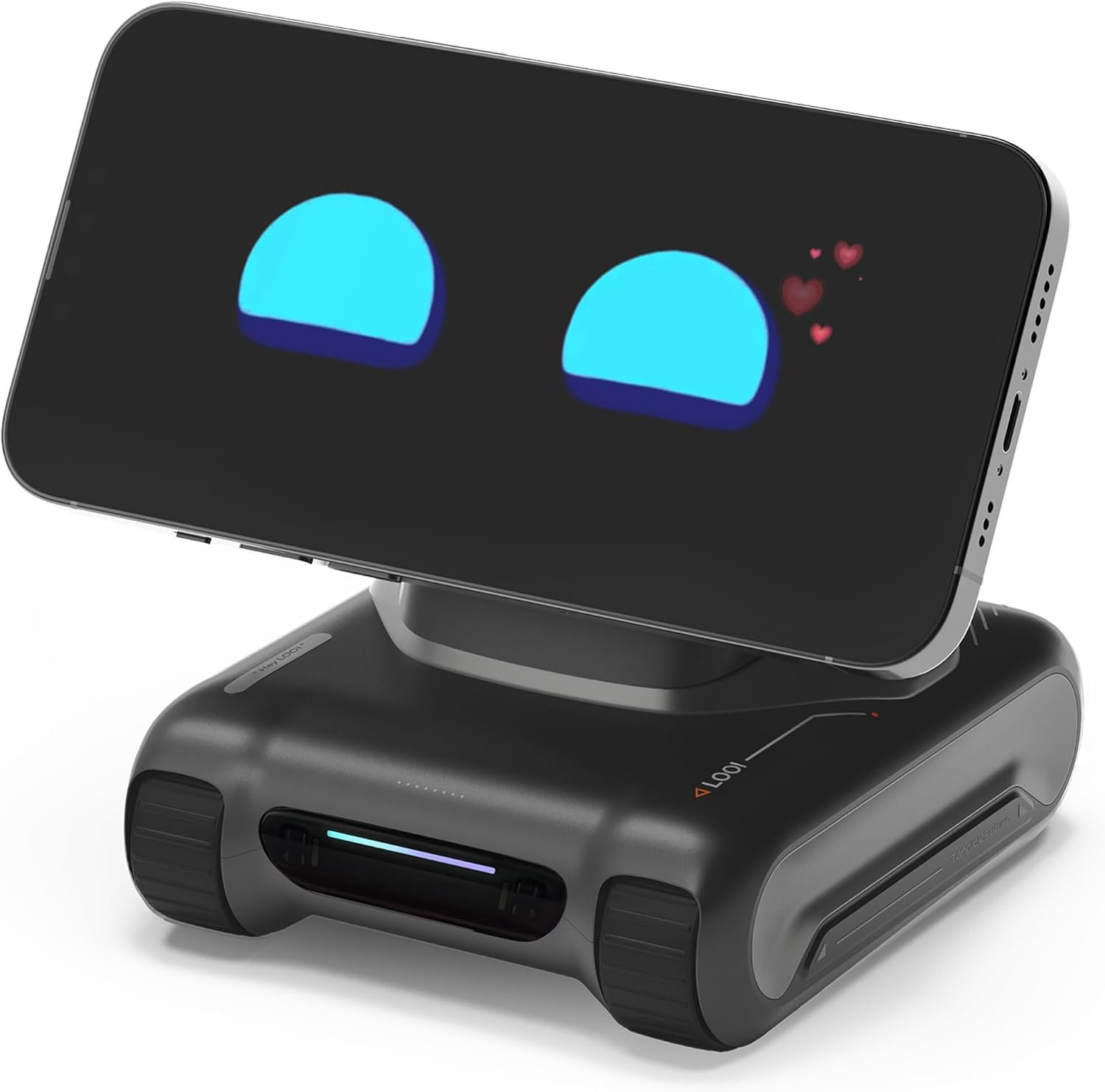
    The LOOI Robot in Space Black is an example of this category. Positioned as an AI desktop companion, it is designed around voice interaction, visual understanding, and a personality-oriented approach to communication. Its advertised features include interaction with AI services such as ChatGPT and Gemini, memory-related functions, and 10W wireless charging. These capabilities place it somewhere between a conventional smart assistant, a desktop gadget, and an interactive electronic companion.

    Unlike a traditional smart speaker, a desktop companion robot is intended to offer a more tangible presence. Its physical form can make interactions feel different from speaking to a phone or typing a question into a browser. Depending on its supported software and operating requirements, a device in this category may be used to ask questions, explore ideas, interact with AI, or add an interactive element to a home office.

    However, AI companion devices also introduce questions that are less important when purchasing an ordinary desk accessory. Buyers may want to understand how the device connects to AI services, whether its features require an internet connection, how memory works, what information it processes, and whether the wireless charging feature supports their particular phone.

    This guide explores the LOOI AI desktop companion from an informational perspective. It explains the advertised feature categories, practical usage scenarios, potential advantages, limitations, and questions worth investigating before making a decision. Because software capabilities, subscriptions, compatibility, and product specifications can change, readers should confirm current details through the manufacturer’s documentation and the Amazon product listing.

    Understanding the LOOI AI Desktop Companion

    LOOI belongs to a category of technology that combines artificial intelligence with a physical desktop device. Instead of interacting exclusively through a screen, users engage with a dedicated object that is designed to respond through supported input and output methods.

    The product is described as an AI desktop companion in Space Black, with advertised ChatGPT and Gemini voice interaction, visual understanding, personality and memory features, and 10W wireless charging.

    These features serve different purposes. Voice interaction focuses on communication, visual understanding concerns interpreting supported visual input, personality and memory relate to the character and continuity of interactions, and wireless charging adds a separate practical function.

    Understanding the distinction between these capabilities is important because they do not necessarily operate under the same conditions. Some may depend on an internet connection, a companion application, device permissions, compatible hardware, or the availability of a particular AI service.

    An AI desktop robot should also not automatically be treated as a fully autonomous household robot. A device designed for conversation and desktop interaction may not offer the movement, manipulation, navigation, or physical task capabilities associated with larger robotic systems.

    For most prospective users, the relevant question is whether its combination of AI interaction, desktop presence, and additional features fits their intended use.

    Key Features of the LOOI Robot

    1. Voice Interaction With AI Services

    One of the product’s advertised features is voice interaction with ChatGPT and Gemini. These are AI services that can support a range of conversational and information-oriented tasks, depending on the model, service configuration, and access available to the user.

    Voice interaction can make certain activities more convenient than typing. For example, someone working at a computer may want to ask a question while keeping their hands on the keyboard. A student may prefer to speak a question aloud when exploring a subject, while a person developing an idea may find conversational brainstorming easier than entering several separate prompts.

    Potential uses include:

    • Asking general knowledge questions.
    • Exploring unfamiliar concepts.
    • Brainstorming article topics or creative ideas.
    • Practising explanations of academic subjects.
    • Generating outlines for personal projects.
    • Discussing everyday technology questions.
    • Requesting summaries or alternative explanations of information.

    The quality of these interactions depends on more than the physical device. It can be affected by microphone performance, background noise, network connectivity, the AI service being used, software updates, and the clarity of the user’s question.

    It is also important to distinguish between access to an AI service and ownership of that service. Advertising compatibility with ChatGPT or Gemini does not necessarily mean that every model, feature, or subscription benefit is included with the hardware. The current product documentation should explain whether users need separate accounts, subscriptions, application setup, or other services.

    AI-generated answers may also contain mistakes or outdated information. Users should verify important claims, especially when dealing with medical, legal, financial, or other high-impact decisions.

    2. Visual Understanding

    The LOOI product description advertises visual understanding, suggesting that visual information can play a role in its supported AI interactions.

    Visual AI systems can sometimes interpret images or scenes and use that information to provide contextual responses. In a desktop setting, this type of functionality may make interactions more flexible than a voice assistant that can only respond to spoken questions.

    Depending on the device’s actual implementation, possible applications for visual understanding in AI products include discussing a visible object, interpreting supported visual input, or asking questions about information presented to the system.

    For example, a user learning about electronics might want help identifying a component in an image. Someone working on a creative project might want to discuss the general appearance of a visual reference. A student could potentially use supported visual features to explore an educational diagram.

    These are examples of uses associated with visual AI, not a guarantee that every scenario is supported by LOOI.

    Before relying on the feature, buyers should establish how visual input is captured, whether the device contains a camera or uses another supported input method, what permissions are needed, and which image formats or functions are available.

    Visual understanding also has limitations. AI systems may misidentify objects, overlook details, or misinterpret what an image shows. They should not be relied upon as the sole source of evidence for safety-critical inspection or other high-stakes assessments.

    Privacy is another important consideration. If a device processes images, users should understand whether information is processed locally or transmitted to an external service, how data is retained, and whether any visual features can be disabled.

    3. Personality-Oriented Interactions

    The product listing highlights personality as part of its companion experience. In AI products, personality generally refers to the conversational style, tone, or character presented during interactions.

    A system with a consistent conversational style may feel different from a conventional assistant that simply answers direct commands. It might respond in a more playful, friendly, or expressive manner, depending on its software and available settings.

    For people who enjoy technology as a hobby, this approach can make a desktop device more engaging than a passive accessory. A user may appreciate having an interactive object on a desk that can participate in casual conversation or provide a more character-oriented interface to AI tools.

    Personality can also affect the experience of using the same AI capability for different purposes. A casual discussion may benefit from a relaxed tone, while a technical question may require a direct and precise explanation.

    Nevertheless, a programmed personality should not be confused with human consciousness, genuine emotions, or independent personal intentions. A conversational system can generate expressive responses without having human experiences.

    This distinction matters when evaluating AI companions. The device can be an enjoyable part of a technology setup while still being understood as a software-driven product.

    4. Memory and Continuity

    Memory is another advertised feature of the LOOI companion. In AI systems, the term can refer to several different mechanisms, and it is worth determining which one a particular device supports.

    Some systems maintain context during a single conversation. Others may store selected preferences or information across separate sessions. Still others may provide configurable memory controls that allow users to review, modify, or delete stored information.

    These functions are not interchangeable.

    Conversation context can help an AI respond coherently to follow-up questions. Persistent memory, when available, may allow a system to take account of previously saved preferences or recurring interests. The practical value depends on how accurately the system retains relevant information and how much control the user has over that information.

    For example, a user might want an assistant to remember that they are learning a particular subject or prefer concise explanations. If the product supports persistent preferences, this could reduce the need to repeat those details in every interaction.

    However, the exact memory behavior of LOOI should be verified in its current documentation. The product description alone does not establish what is stored, how long it is retained, whether users can inspect it, or whether information is shared with external AI providers.

    Before enabling memory, consider what information the device may process. Avoid sharing passwords, authentication codes, financial account details, private business information, or other sensitive material unless the relevant service has appropriate safeguards and the information is genuinely necessary.

    A useful AI companion should provide clear information about its data practices and offer meaningful controls over stored information.

    5. A Physical Presence on the Desktop

    A major difference between an AI desktop companion and a conventional AI application is the physical device itself.

    A smartphone application is portable, while a browser-based assistant can be accessed from many computers. A dedicated desktop robot, by contrast, is designed to occupy a specific place in a workspace.

    That physical presence may appeal to people who enjoy desk gadgets, interactive technology, and distinctive workstation accessories. It can become part of a personal setup alongside a monitor, keyboard, headphones, speakers, and lighting.

    The experience is different from simply opening an AI website because the interaction is associated with a dedicated object rather than an ordinary application window.

    However, physical presence also means the product requires space, setup, power management, and potentially additional connectivity. Buyers should consider whether the device’s size and operating requirements suit their desk.

    The manufacturer’s current specifications should be consulted for dimensions, power requirements, supported operating environments, and other installation details.

    6. 10W Wireless Charging

    The LOOI product description advertises 10W wireless charging, adding a practical function beyond AI interaction.

    Wireless charging can reduce the need to connect a compatible phone to a cable for every charging session. When integrated into a desktop accessory, it may help organize a workspace by combining an electronic companion with a charging location.

    However, wireless charging depends on compatibility between the charging surface and the device being charged. Support can vary according to the phone model, charging standard, alignment, case thickness, and other conditions.

    The advertised 10W figure should not be interpreted as a guarantee that every compatible phone will receive 10W of power. Actual charging performance may be lower because of device limitations, thermal management, positioning, or other technical factors.

    Buyers should verify which phones and charging standards are supported, whether a separate power adapter is required, and whether the advertised charging feature operates while the AI companion is active.

    Wireless charging is a convenience feature rather than a replacement for checking the requirements of the phone and the charging accessory. It should also be considered separately from the robot’s AI capabilities: a device may offer useful charging functionality even when its conversational features are not in use.

    7. A Gadget-Oriented Design

    LOOI is presented as a technology-focused desktop companion and an electronic gift. That positioning may appeal to people who enjoy experimenting with AI, collecting unusual gadgets, or customizing their workspace.

    The combination of a physical robot and conversational software can be more distinctive than a conventional computer accessory. It may also provide an approachable way to explore how AI is being incorporated into consumer electronics.

    Still, appearance and novelty are only part of the decision. A gadget that looks interesting on a desk may be less useful if it is difficult to configure, depends on services the user does not want to maintain, or offers features that do not fit their habits.

    A sensible evaluation should consider the product’s ongoing usefulness, compatibility, privacy controls, and setup requirements alongside its visual design.

    How the LOOI AI Desktop Companion Can Be Used

    The potential uses of an AI desktop companion depend on its supported features, but several everyday scenarios help explain where this category may fit.

    Supporting Everyday Research

    People often encounter questions while working on a computer. They may want a definition, a simple explanation, or a starting point for further research.

    A voice-enabled AI companion may provide a convenient way to ask questions without switching repeatedly between applications. For example, someone researching a new technology could ask for a plain-language explanation before reading technical documentation.

    The response should be treated as a starting point rather than a final authority. For factual work, users should consult reliable sources and verify important details.

    Brainstorming Creative Projects

    Content creators, bloggers, students, and hobbyists often need help generating ideas or organizing their thoughts.

    A conversational AI interface can support brainstorming by suggesting possible topics, comparing approaches, or helping structure an initial outline. A person planning an article, for example, might use AI to identify questions a reader could have about a subject.

    The final work still requires human judgment, editing, and fact-checking. AI suggestions can be repetitive, incomplete, or incorrect, and original content should reflect the creator’s own research and editorial decisions.

    For users who prefer speaking rather than typing every idea, voice interaction may offer a convenient alternative.

    Exploring Educational Topics

    Students and lifelong learners can use conversational AI to explore subjects they find difficult.

    A learner studying programming might ask for a conceptual explanation of a loop or variable. Someone learning a new language could practise simple conversational exchanges if the relevant service supports that use. A student studying economics might request an example that illustrates an unfamiliar concept.

    The educational value depends on how the tool is used. Asking follow-up questions, checking explanations against course materials, and attempting exercises independently can support deeper understanding than simply accepting generated answers.

    AI systems can also make errors in calculations, definitions, and explanations. They should complement established learning resources rather than replace teachers, textbooks, or formal instruction.

    Organizing a Home Office

    A desktop companion can occupy a place in a home office alongside a laptop, external monitor, and other equipment.

    If its supported AI features are useful during work, it may become a convenient point of access for quick questions and brainstorming. Its wireless charging function may also provide a designated place for a compatible phone.

    However, users should consider whether a conversational device will be helpful or distracting. People who frequently participate in video calls may need to think about microphone placement, background audio, and whether the companion’s interactions could interfere with meetings.

    The device’s physical footprint and power requirements should also be considered when planning a compact workspace.

    Adding an Interactive Element to a Desk Setup

    Some people choose desktop accessories primarily because they enjoy the technology itself.

    An AI companion may suit a desk built around gadgets, robotics, gaming equipment, or smart devices. Its interactive features can add a different dimension to the setup compared with a static ornament.

    For hobbyists, the product may also provide a way to explore the broader consumer AI ecosystem, including conversational interfaces and the relationship between software and physical devices.

    The level of interaction, customization, and responsiveness should be verified before purchase rather than assumed from promotional imagery alone.

    Using AI for Personal Planning

    Conversational AI can sometimes help users break down a broad goal into smaller tasks or think through a personal project.

    For instance, someone planning a study schedule might ask for a sample weekly structure. A person preparing a presentation could request an outline or a list of questions to investigate.

    Whether LOOI can perform these tasks in a convenient way depends on the AI services and software features available in its current configuration.

    Users should also remember that generated schedules and suggestions are not automatically synchronized with calendars or task-management applications. Any integration should be confirmed in the product documentation.

    Who May Find the LOOI Robot Suitable?

    Technology Enthusiasts

    People who enjoy experimenting with new devices may appreciate a product that combines AI interaction with a physical desktop form.

    It offers a way to explore a consumer technology category that differs from traditional smart speakers and phone applications. The appeal may be especially strong for users who like trying new interfaces and observing how AI features evolve.

    Remote Workers and Home Office Users

    A desktop companion may interest people who spend substantial time at a computer and want quick access to conversational AI.

    It could be useful for occasional questions, brainstorming, or learning activities, provided its interaction method fits the user’s workflow. Workers who require uninterrupted concentration, however, may prefer a less interactive accessory.

    Students and Independent Learners

    Learners who frequently ask questions and explore new topics may find voice-based AI convenient.

    The device could become an additional learning aid, but students should confirm its account requirements and service access. They should also use it responsibly and follow academic rules regarding AI assistance.

    Gadget Collectors and Desk Setup Enthusiasts

    People who enjoy distinctive computer accessories may be interested in LOOI because it combines a physical device with AI features.

    Its potential value for this audience may include the interactive experience, visual presence, and additional charging functionality. Buyers should still consider whether they want an actively used device or mainly a decorative object.

    Gift Buyers

    The product’s technology-oriented positioning may make it relevant for someone who enjoys robotics, artificial intelligence, or unusual desktop gadgets.

    Before giving it as a gift, consider the recipient’s interest in connected devices and willingness to complete software setup. A product that requires account registration, network access, or a compatible phone may be less suitable for someone who prefers simple, offline accessories.

    Confirming these requirements can help avoid giving a device that the recipient cannot easily use.

    Important Things to Consider Before Choosing LOOI

    Internet and Account Requirements

    Connected AI devices may depend on internet access for conversational responses or other cloud-based features.

    The product listing should be checked for Wi-Fi requirements, supported phone operating systems, companion applications, account registration, and any necessary setup process.

    If the device relies on an external AI service, availability may also depend on that service’s terms, regional support, and ongoing operation. A feature advertised today may change as the underlying software evolves.

    AI Service Access and Possible Additional Costs

    The reference to ChatGPT and Gemini does not automatically establish that all associated services are included without additional fees.

    Some AI capabilities may require separate accounts, subscriptions, usage limits, or specific access levels. Others may be available through a particular integration provided by the device manufacturer.

    Before purchasing, verify which services are supported, which models or features are available, and whether ongoing payments are required. Do not assume that buying the hardware includes a paid subscription to an external AI platform.

    Privacy and Data Handling

    AI companion devices can raise privacy questions because users may speak to them in shared spaces and may enable memory or visual features.

    Before using the device, review its privacy policy and the policies of any external AI service it connects to. Determine whether audio, images, transcripts, or conversation history may be transmitted to remote servers, and learn how stored data can be deleted.

    If the device uses a camera or microphone, understand when those components are active and whether recording indicators or privacy controls are available. Avoid placing a connected device in locations where private conversations or sensitive information could be captured unintentionally.

    For workplace use, consider company policies before discussing confidential documents or business information with an AI assistant.

    Accuracy and Reliability

    AI-generated responses can sound confident even when they are wrong. They may misunderstand spoken questions, overlook visual details, or provide information that is no longer current.

    This is especially relevant when using AI for technical troubleshooting, professional research, or important decisions.

    Treat the companion as a tool for assistance and exploration rather than an unquestionable source. Check significant claims against authoritative sources and use professional advice where appropriate.

    Compatibility and Setup

    The actual experience depends on the device’s supported hardware and software.

    Check which smartphones, operating systems, charging standards, and network configurations are supported. If the product requires a particular application or a specific version of an operating system, confirm that your existing equipment meets those requirements.

    Also examine the setup instructions. A technically curious user may enjoy configuring a connected gadget, while someone expecting a completely plug-and-play experience may want to understand the process first.

    Charging Performance

    The advertised 10W wireless charging feature may be useful, but its practical value depends on the phone and charging setup.

    Confirm whether your phone supports the relevant wireless charging standard, whether its case affects alignment, and whether the necessary power adapter is included. Review any manufacturer guidance about simultaneous operation and charging.

    If fast charging is a priority, compare the device’s verified charging specifications with the requirements of your phone rather than relying solely on the wattage mentioned in the product title.

    Long-Term Software Support

    Connected gadgets can depend on software updates, external services, and ongoing compatibility.

    Consider whether the manufacturer provides documentation about updates, troubleshooting, customer support, and service availability. If an AI integration changes, the device’s functionality may also change.

    This matters particularly for products whose appeal depends heavily on cloud-based AI rather than simple offline functions.

    Physical Space and Everyday Distractions

    A desktop companion needs a suitable place on a desk. If the workspace is already crowded, its dimensions and positioning may matter.

    Voice interaction can also introduce interruptions. Someone who spends the day writing, coding, or attending meetings may prefer to establish clear times for using the device rather than leaving it active throughout every task.

    A device is more likely to be useful when it supports an existing routine instead of competing with it.

    Comparing AI Desktop Companions With Other Device Categories

    Understanding the alternatives can help clarify what makes a product like LOOI different.

    AI Desktop Companions Versus Smart Speakers

    Smart speakers generally focus on voice commands, audio playback, information requests, and supported smart home functions. Their design often prioritizes sound output and hands-free interaction.

    An AI desktop companion emphasizes a physical character or robot-like presence alongside conversational interaction. Depending on the model, it may offer visual features or a more expressive interface.

    Neither category is automatically more useful for every user. Someone who primarily wants music playback or voice-controlled lights may prefer a conventional smart speaker. Someone interested in an interactive desk gadget may be more drawn to a companion robot.

    AI Desktop Companions Versus Smartphone AI Applications

    Smartphone applications offer portability and access to AI services from almost anywhere. They can be convenient for people who already use a phone as their main personal device.

    A dedicated desktop companion instead provides a separate physical interface in a fixed location. Its appeal may come from the interaction style and integration into a workstation.

    The trade-off is that a dedicated device can require additional setup, space, and maintenance. Users who only need occasional AI assistance may find a phone application sufficient.

    AI Desktop Companions Versus Traditional Desktop Gadgets

    Traditional desk accessories include lamps, charging stands, figurines, clocks, and organizers. Their functionality is often predictable and does not depend on conversational software.

    An AI companion adds software-driven interaction, which can make the experience more flexible but also more dependent on connectivity and updates.

    People who prefer simple accessories that work without accounts or internet access may prefer traditional gadgets. Those interested in exploring conversational AI may see value in a connected device.

    AI Desktop Companions Versus Educational Robots

    Educational robots are often designed around structured learning activities, programming exercises, or specific developmental goals.

    A general-purpose AI desktop companion may instead focus on conversation, personality, and everyday interaction. It should not automatically be considered an educational robotics platform simply because it incorporates AI.

    Parents and educators should check the manufacturer’s age guidance, privacy provisions, content controls, and supported educational features before using any connected AI product with children.

    Frequently Asked Questions

    What is the LOOI AI desktop companion?

    LOOI is marketed as an AI desktop companion robot. Its product description highlights voice interaction with ChatGPT and Gemini, visual understanding, personality and memory features, and 10W wireless charging.

    The precise capabilities and operating requirements should be confirmed through the current product listing and manufacturer documentation.

    Does LOOI support ChatGPT and Gemini?

    The product description advertises interaction with both ChatGPT and Gemini. However, the exact integration, supported models, access requirements, and availability of individual features should be verified before purchase.

    Compatibility does not necessarily mean that all functions of either AI service are included.

    Does the robot require an internet connection?

    Connected AI devices commonly require internet access for cloud-based features, but the exact requirements for LOOI should be checked in its current setup documentation.

    Confirm whether an internet connection is necessary for initial setup, voice interaction, software updates, or other advertised functions.

    What does visual understanding mean?

    Visual understanding generally refers to an AI system’s ability to interpret supported visual input and use it when responding to a user.

    The specific visual capabilities available on LOOI depend on its hardware and software. Check how visual input is provided, what tasks are supported, and what permissions are required.

    What does the memory feature do?

    Memory can refer to conversational context or the ability to retain selected information across separate sessions.

    The product description advertises memory-related functionality, but buyers should confirm what information LOOI can remember, whether that information persists, and what controls are available for viewing or deleting stored data.

    Can LOOI charge a smartphone wirelessly?

    The product description advertises 10W wireless charging. Actual compatibility and charging performance depend on the phone, supported charging standard, alignment, and other technical factors.

    Check the manufacturer’s compatibility information and confirm whether a separate power adapter is needed.

    Is the 10W charging speed guaranteed for every phone?

    No. A stated charging wattage does not guarantee that every phone will charge at that rate. The phone must support compatible wireless charging, and actual output may be affected by the charging setup and device limitations.

    Consult both the phone manufacturer’s specifications and the LOOI documentation.

    Is LOOI suitable for a student?

    It may interest students who want to explore conversational AI, ask general questions, or brainstorm ideas. Its suitability depends on the student’s needs, the device’s setup requirements, and the availability of appropriate privacy and content controls.

    AI-generated educational material should be checked against reliable learning resources.

    Is this type of device useful for a home office?

    It may be useful for people who enjoy having a dedicated AI interface on their desk. Potential applications include brainstorming, general questions, and selected planning tasks.

    Its usefulness depends on whether the interaction method fits the person’s workflow and whether the device introduces unwanted distractions.

    Does the device have to remain connected to external AI services?

    That depends on its architecture and the functions being used. Cloud-based conversational features generally require access to the relevant service, while other functions may operate differently.

    The current product documentation should clarify which capabilities require internet access and whether any features work offline.

    Is an AI desktop companion the same as a human companion?

    No. Although conversational software can produce friendly or expressive responses, it does not establish that the device has human consciousness, emotions, or personal experiences.

    It is more accurate to understand the product as a connected electronic device that provides an interactive AI experience.

    What should buyers check before purchasing LOOI?

    Review the included hardware, supported devices, internet and account requirements, AI service access, privacy controls, wireless charging compatibility, setup process, and software support.

    These details help establish whether the product is appropriate for your workspace and whether its advertised features match your expectations.

    Conclusion

    The LOOI Robot in Space Black combines several technology categories in a single desktop-oriented device. Its advertised features include voice interaction with ChatGPT and Gemini, visual understanding, personality and memory functions, and 10W wireless charging.

    This combination may appeal to technology enthusiasts, home office users, students, and people who enjoy interactive desk accessories. Voice-based AI can offer a convenient way to explore questions and ideas, while personality-oriented interaction gives the device a different character from a conventional computer accessory. Wireless charging adds a separate practical function when used with compatible phones.

    However, the value of an AI companion depends on more than its feature list. Buyers should verify the exact AI integrations, connectivity requirements, account or subscription conditions, privacy controls, charging compatibility, and long-term software support. They should also understand that AI responses can contain errors and that advertised visual or memory capabilities may have specific limitations.

    For users who want a connected gadget that combines conversational AI with a physical desktop presence, LOOI may be worth investigating. Those who mainly need portable AI assistance, a basic wireless charger, or a simple desk accessory may find that a more specialized alternative better matches their needs.

    The most sensible approach is to compare the product’s verified specifications with the features you will actually use.

    You can check more details on Amazon here:

    As an Amazon Associate, we earn from qualifying purchases.
  • Keyboard Cleaner and Laptop Cleaning Kit: A Practical Guide to Keeping Your Computer Accessories Clean

    Keyboard Cleaner and Laptop Cleaning Kit: A Practical Guide to Keeping Your Computer Accessories Clean

    Introduction

    Keyboards, laptops, desktop computers, and other electronic devices are part of everyday life for students, professionals, remote workers, gamers, and households. These devices are frequently handled throughout the day, and their surfaces can gradually collect dust, fingerprints, skin oils, crumbs, and other small particles. Although regular use is unavoidable, keeping computer equipment clean can help maintain a more comfortable workspace and make routine device care easier.

    Cleaning electronics, however, requires a different approach from cleaning ordinary household objects. A laptop keyboard contains narrow spaces between keys, while a computer monitor has a surface that can be damaged by unsuitable cleaning products. Earbuds, charging ports, camera lenses, and other small accessories also have areas that are difficult to reach with a standard cloth. Using excessive moisture, sharp tools, or too much pressure may cause damage rather than improve cleanliness.

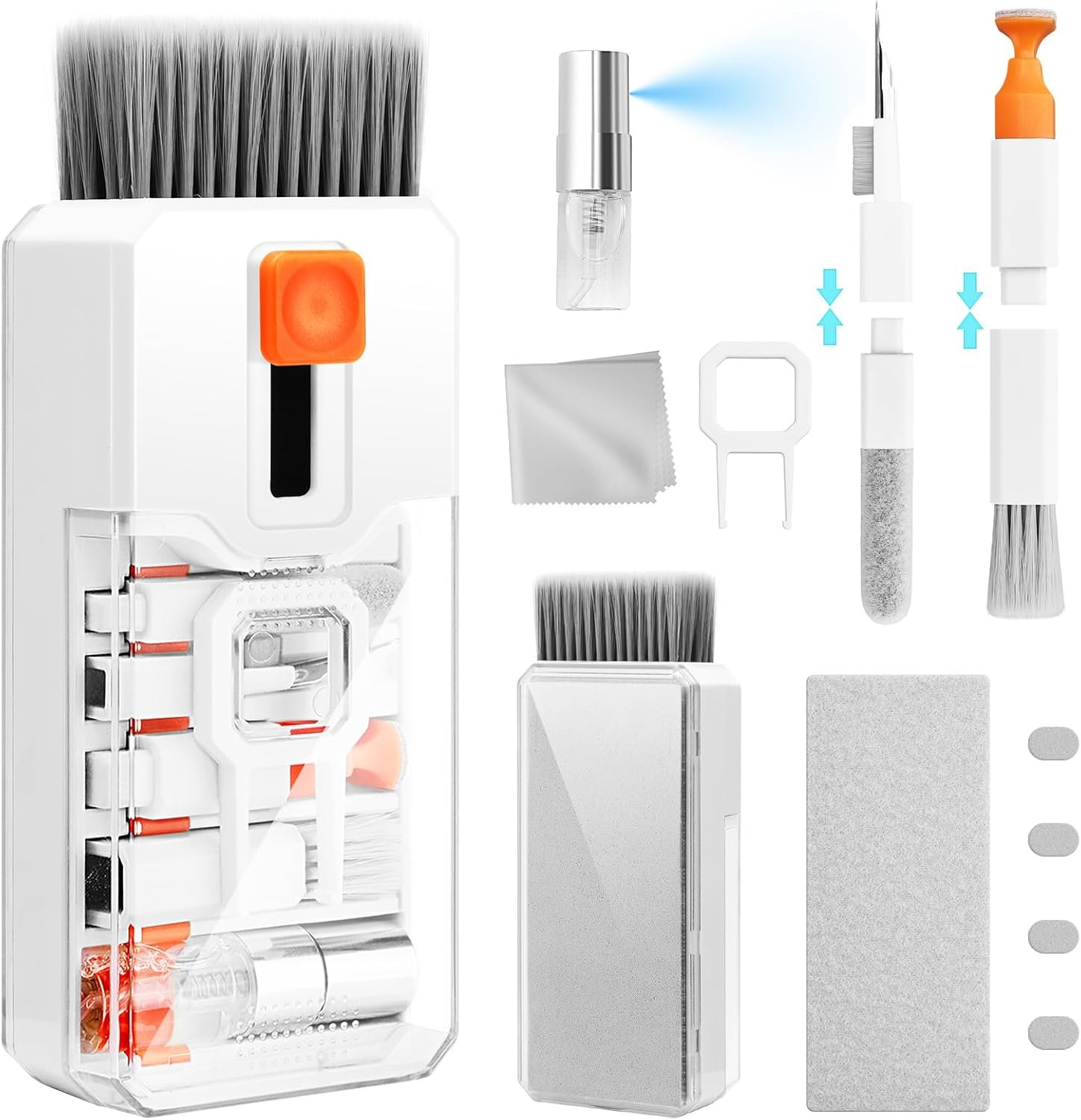
    A keyboard cleaner and laptop cleaning kit is designed to make these everyday maintenance tasks more manageable by bringing several cleaning tools together in one collection. Instead of searching for separate brushes, cloths, and small detailing tools, users can keep a selection of accessories in one convenient place. Depending on the kit’s exact contents, these tools may help remove loose dust, clean around keyboard keys, wipe compatible screens, and reach certain narrow areas on electronic accessories.

    The Ordilend Keyboard Cleaner and Laptop Cleaning Kit is listed on Amazon as an all-in-one cleaning accessory for computers and related electronics. Anyone considering this type of kit should understand what different cleaning tools are intended to do, how to use them safely, and which details to verify before purchasing.

    This guide explains the practical uses of an all-in-one computer cleaning kit, the advantages and limitations of different cleaning methods, and the precautions that matter when maintaining electronic equipment. The goal is to help readers determine whether this style of cleaning kit fits their workspace, devices, and cleaning habits.

    Key Features of an All-in-One Keyboard and Laptop Cleaning Kit

    A multifunctional electronics cleaning kit typically combines tools for several maintenance tasks. The exact accessories, dimensions, materials, and included components can vary between models, so the current Amazon listing should be consulted to confirm the configuration of the Ordilend kit.

    The following sections explain the common tool categories found in this type of product and how each may contribute to routine computer maintenance.

    1. Brushes for Keyboard Dust and Loose Debris

    Keyboard brushes are useful for removing loose particles from the spaces around individual keys. Over time, small amounts of dust, lint, and crumbs can settle between keycaps or along the edges of a keyboard. A soft brush can help lift this material without requiring the user to wipe every key individually.

    Different brush designs serve different purposes. A broader brush can cover the surface of a keyboard relatively quickly, while a smaller detailing brush may provide better access to narrow gaps and corners.

    When selecting a brush, softness matters. A brush with stiff or rough bristles may scratch delicate finishes or place unnecessary pressure on exposed components. Users should also avoid pushing debris deeper into the keyboard by brushing aggressively.

    For routine cleaning, the most practical approach is to turn off or disconnect the device, tilt the keyboard carefully if its design permits, and use gentle strokes to move loose particles away from the key gaps.

    A brush does not necessarily remove every type of contamination. Sticky residue, dried spills, and oily deposits may require a different cleaning method, and some problems cannot be addressed safely without professional servicing.

    2. Tools for Cleaning Between Keys

    The spaces between keyboard keys can be difficult to reach with a conventional microfiber cloth. Small cleaning tools are intended to address these areas by reaching around key edges and into narrow gaps.

    Depending on the kit, these accessories may include compact brushes, narrow detailing tools, or other specialized attachments. Their precise shape and intended use should be checked against the manufacturer’s instructions before use.

    These tools can be particularly helpful for mechanical keyboards, desktop keyboards with visible gaps between keycaps, and laptop keyboards that collect loose dust during regular use.

    However, not every keyboard has the same construction. Some keyboards have low-profile keys, delicate scissor mechanisms, or manufacturer-specific keycap designs. A tool that works on one keyboard may not be suitable for another.

    Avoid inserting a rigid tool deeply beneath a key or attempting to remove keycaps without confirming that the keyboard supports this procedure. Laptop keys can be especially delicate, and their clips may break if lifted incorrectly.

    For ordinary maintenance, gentle surface cleaning is usually preferable to dismantling the keyboard.

    3. Microfiber Cloths for Compatible Screens and Surfaces

    A clean microfiber cloth is one of the most useful accessories for maintaining electronic devices. It can help remove fingerprints, light dust, and surface smudges from compatible screens, laptop lids, touchpads, and other smooth surfaces.

    Microfiber is designed to collect small particles while reducing the need for abrasive wiping. Nevertheless, the condition of the cloth matters. A cloth that has collected grit, dried residue, or dirt may scratch a delicate display when rubbed against it.

    Before cleaning a screen, inspect the cloth and remove visible particles. Use light pressure and avoid rubbing a dusty surface aggressively.

    Screen coatings also vary. Laptop displays, touchscreen devices, tablets, and external monitors may have different manufacturer recommendations. Some manufacturers advise using a dry microfiber cloth for routine cleaning, while others permit a specific screen-safe cleaning solution when necessary.

    Do not assume that a cleaning solution is appropriate simply because it is marketed for electronics. Check the device manufacturer’s instructions, especially for displays with anti-reflective coatings or other specialized finishes.

    A microfiber cloth can also be useful for cleaning the outside of a laptop, provided the surface material is compatible with the cleaning method being used.

    4. Compact Tools for Small Electronic Accessories

    An all-in-one electronics cleaning kit may include small tools intended for accessories such as wireless earbuds, charging cases, headphones, and other personal electronics.

    These accessories often have narrow openings, seams, and textured surfaces that are difficult to clean with a large cloth. A small, appropriately designed brush can help remove loose particles from accessible exterior areas.

    For example, someone who uses wireless earbuds daily may want to remove visible debris from the outside of the charging case. A person who works with headphones may need to clean the exterior around buttons, hinges, or adjustable components.

    However, small electronic accessories require careful handling. Earbud speaker meshes, microphone openings, and charging contacts should not be treated like ordinary surfaces. Inserting a tool too deeply can damage internal components or push debris farther inside.

    Avoid using sharp metal objects, excessive force, or liquids near openings. Follow the manufacturer’s cleaning instructions for each accessory, and do not use a generic tool on a sensitive component unless its suitability is clear.

    The usefulness of these accessories depends on the kit’s actual contents and the types of devices being maintained.

    5. Tools Designed for Hard-to-Reach Areas

    Dust can collect around hinge edges, connection panels, narrow seams, and other small spaces. Compact detailing tools may make these areas easier to access than a standard cloth.

    A laptop hinge, for example, may accumulate visible dust along its exterior. A gentle brush can help remove loose material from the accessible surface without forcing the tool into the mechanism.

    Likewise, the exterior edges of a keyboard or the spaces around a desktop monitor stand may benefit from occasional detailing.

    The important distinction is between cleaning an accessible surface and attempting to clean inside a device. A narrow tool should not be pushed into a laptop chassis, cooling fan, port, or other internal opening unless the manufacturer specifically permits that method.

    If a computer is overheating, making unusual noises, or showing signs of internal dust buildup, an external cleaning kit may not solve the problem. Internal maintenance can require specialized procedures and may be better handled by a qualified technician.

    6. A Combined Kit for Routine Maintenance

    The main practical appeal of a multifunctional cleaning kit is organization. When several cleaning accessories are stored together, it becomes easier to establish a regular maintenance routine.

    A user might keep the kit beside a home office computer, in a desk drawer, or with other workstation accessories. Having tools readily available can make brief cleaning sessions more convenient than collecting separate supplies each time.

    The benefit depends on the actual design of the kit. Buyers should examine the product photographs, included-item list, dimensions, storage arrangement, and instructions rather than assuming that every all-in-one kit contains the same tools.

    It is also worth considering whether the kit duplicates items already available at home. Someone who owns a suitable microfiber cloth and a soft keyboard brush may need fewer additional accessories than a person starting from scratch.

    How a Keyboard and Laptop Cleaning Kit Can Be Used

    A cleaning kit can support several everyday maintenance tasks. The appropriate method depends on the device, the type of contamination, and the tools included.

    Cleaning a Laptop Keyboard

    Laptop keyboards are frequently exposed to dust, fingerprints, and small particles from everyday use. Because the keyboard is integrated into the computer, cleaning it requires particular care.

    Begin by shutting down the laptop and disconnecting its charger and other cables. If the manufacturer recommends additional precautions, follow those instructions.

    Use a soft, dry brush to remove loose particles from the keyboard surface. Work gently around the keys, avoiding excessive pressure. If the laptop manufacturer’s instructions permit it, you can carefully tilt the device to help loose debris fall away from the keyboard.

    Next, use a clean microfiber cloth to wipe the tops of the keys and the surrounding palm-rest area. The cloth should be dry or treated only with a manufacturer-approved cleaning method. Never spray liquid directly onto the keyboard.

    Do not pour cleaning solution into key gaps or attempt to flush out dirt. Even a small amount of liquid can cause problems if it reaches the internal electronics.

    If a key is sticking because of a spill, surface brushing may not be sufficient. Consult the laptop manufacturer’s guidance or seek professional assistance rather than forcing the key to move.

    Maintaining a Desktop Computer Keyboard

    A desktop keyboard is often easier to position for cleaning because it can usually be disconnected and moved independently of the computer.

    After disconnecting it, inspect the keyboard for loose debris. Use a soft brush to remove dust around the key edges and along the frame. A microfiber cloth can then be used to clean the key surfaces and exterior housing.

    For keyboards that support removable keycaps, more extensive cleaning may be possible, but the manufacturer’s instructions should be checked first. Some keyboards are designed for easy keycap removal, while others use mechanisms that can be damaged during disassembly.

    If you use a mechanical keyboard, consider whether the manufacturer’s maintenance recommendations distinguish between cleaning the keycaps and cleaning the underlying switches. These are different tasks and may require different procedures.

    A compact kit can help with routine surface maintenance, but it should not be treated as a replacement for model-specific repair instructions.

    Cleaning a Laptop Screen

    Displays are among the most sensitive surfaces on a computer. Fingerprints and dust can be distracting, but improper cleaning can damage coatings or leave additional marks.

    Start by shutting down the display if recommended by the manufacturer. A dark screen can make dust and fingerprints easier to see.

    Use a clean microfiber cloth to remove loose dust with light, gentle movements. Avoid pressing firmly against the screen, particularly on thin laptop panels.

    If smudges remain, check the manufacturer’s cleaning guidance before using moisture or a cleaning product. Some displays can be cleaned with a slightly dampened cloth, while others require specific restrictions.

    Never spray liquid directly onto the screen. Do not use abrasive pads, household glass cleaners, or solvents unless the manufacturer explicitly approves them for that particular display.

    If a cleaning kit includes a liquid or spray, verify its ingredients and compatibility rather than assuming it is safe for every monitor or laptop.

    Cleaning Earbuds and Headphone Exteriors

    Wireless earbuds and headphones are often handled repeatedly throughout the day. Their exterior surfaces may collect fingerprints, dust, and other visible debris.

    A small brush can help remove loose particles from accessible exterior areas, while a microfiber cloth can wipe compatible smooth surfaces.

    For earbuds, avoid pushing dirt into the speaker mesh or microphone openings. Do not apply liquid directly to these openings, and do not use sharp tools to scrape away debris.

    For over-ear headphones, check the care instructions for the ear cushions and headband. Fabric, synthetic leather, genuine leather, and foam materials can require different cleaning methods.

    A generic electronics kit may be helpful for light exterior maintenance, but it should not replace the manufacturer’s specific guidance for sensitive audio components.

    Cleaning Charging Cases and Other Accessories

    Charging cases, external keyboards, mice, and small computer accessories can collect dust along their seams and around buttons.

    Begin by disconnecting the accessory or powering it off where appropriate. Remove loose debris using a soft brush, then wipe compatible exterior surfaces with a clean cloth.

    Pay attention to the material of the accessory. A textured plastic case may tolerate a different cleaning approach from a glossy surface or a device with a specialized coating.

    Avoid introducing moisture into charging ports, switches, seams, and electrical contacts. If a port contains compacted debris, do not force a tool inside without following the manufacturer’s instructions.

    Maintaining a Home Office

    A regular cleaning routine can be useful for anyone who works or studies at a computer for several hours a day.

    For example, a simple weekly routine might involve wiping the desk, brushing loose dust from the keyboard, cleaning the mouse exterior, and removing fingerprints from compatible surfaces. A monitor can be cleaned when needed rather than wiped aggressively every day.

    A kit stored in a desk drawer can help keep these tasks organized. It can also reduce the temptation to use unsuitable household items, such as paper towels that may leave fibers or abrasive materials that can scratch surfaces.

    The frequency of cleaning depends on the environment. A desk near an open window, a workshop, or a kitchen may collect dust and particles more quickly than a relatively enclosed office.

    Who May Find This Type of Cleaning Kit Useful?

    An all-in-one computer cleaning kit may be useful for several types of users, although its value depends on their devices and existing cleaning supplies.

    Remote Workers and Office Professionals

    People who work from home often use a laptop, keyboard, mouse, monitor, headset, and smartphone throughout the day.

    Keeping these devices clean can make the workspace more comfortable and organized. A combined kit may be convenient for occasional keyboard maintenance, screen care, and exterior cleaning of compatible accessories.

    However, workers who mainly use a single laptop and already own a microfiber cloth may not need a large collection of specialized tools.

    Students

    Students frequently carry laptops between classrooms, libraries, shared study areas, and home. These environments can expose devices to dust, crumbs, and fingerprints.

    A compact cleaning kit may be practical for maintaining a laptop keyboard and exterior surfaces. Its usefulness will depend on portability, storage size, and whether the included tools can be transported without becoming damaged or dirty.

    Students should also consider the durability of the accessories and whether the kit contains tools they will realistically use.

    Gamers and Mechanical Keyboard Users

    Gaming setups may include mechanical keyboards, gaming mice, headsets, controllers, and monitors. Some users prefer to keep these accessories clean because dust and debris can accumulate around frequently handled controls.

    A brush and detailing tools can help with accessible exterior surfaces and key gaps. A microfiber cloth may also be useful for compatible monitor surfaces.

    Nevertheless, gaming equipment varies considerably. A tool suitable for a standard keyboard may not be appropriate for a particular switch design, controller opening, or display coating.

    Users who regularly dismantle their keyboards or maintain specialized equipment may prefer tools designed specifically for those tasks.

    People With Multiple Electronic Devices

    Households and workspaces often contain more than one computer, along with tablets, phones, headphones, and charging accessories.

    A multifunctional cleaning kit may reduce the need to store several separate sets of basic tools. It can be especially useful when different household members share a desk or when a small business maintains several workstations.

    Before using the same tool on multiple devices, make sure it is clean and suitable for each surface. A brush used around a dusty keyboard should not immediately be used on a delicate screen without first removing any trapped particles.

    People Setting Up a New Workspace

    Someone building a home office may be purchasing a keyboard, mouse, monitor, laptop stand, and other accessories at the same time.

    A cleaning kit can be considered as part of a broader workstation maintenance setup. It is not an essential purchase for every user, but having suitable tools available can help establish good cleaning habits from the beginning.

    The most useful choice is one that complements the equipment already owned instead of adding accessories that are unlikely to be used.

    Important Things to Consider Before Choosing the Ordilend Kit

    Although an all-in-one kit can be convenient, buyers should examine several practical details before deciding whether a particular model is suitable.

    Confirm the Exact Contents

    The phrase “all-in-one” does not establish which accessories are included. Different cleaning kits can contain very different combinations of brushes, cloths, narrow tools, sprays, or storage accessories.

    Check the current Amazon product listing for the complete item list. Product images may help identify the tool designs, but the written specifications should also be reviewed.

    For the Ordilend Keyboard Cleaner and Laptop Cleaning Kit, verify the current listing rather than relying on a generic description of electronics cleaning kits.

    Check Compatibility With Your Devices

    Not every cleaning tool is suitable for every electronic device. A soft brush may be appropriate for loose dust on a keyboard, but a rigid tool could damage delicate key mechanisms or small openings.

    Likewise, a cloth that is suitable for a laptop lid may not be the right choice for a specialized display coating.

    Before using a tool, consider the device’s construction and manufacturer recommendations. If the intended use is unclear, avoid experimenting on sensitive components.

    Evaluate the Quality of the Materials

    Brush softness, cloth texture, tool construction, and overall durability can affect how useful a cleaning kit is over time.

    A brush should not shed excessive bristles or feel unnecessarily abrasive. A microfiber cloth should be free of visible grit and rough edges. Narrow tools should be used only for the surfaces and tasks for which they are designed.

    Product photographs may provide clues about construction, but they cannot always establish durability. Read the specifications carefully and consider whether the accessories appear suitable for the intended workload.

    Understand the Limitations of Cleaning Tools

    A cleaning kit is primarily a collection of maintenance accessories. It is not a guaranteed solution for every device problem.

    Loose dust on the exterior of a keyboard is different from liquid damage, compacted debris inside a charging port, or dust affecting a laptop’s internal cooling system.

    If a device has malfunctioning keys, unusual overheating, liquid exposure, or signs of internal damage, cleaning its accessible surfaces may not resolve the underlying issue.

    In these cases, follow the manufacturer’s troubleshooting guidance or seek qualified technical assistance.

    Consider Whether Liquids Are Included

    Some electronics cleaning kits include a cleaning solution, while others rely entirely on dry tools. This distinction matters because liquids are not suitable for every device or surface.

    If a solution is included, examine the label and usage instructions. Confirm that it is appropriate for the device you intend to clean, and follow the manufacturer’s guidance regarding moisture.

    Never assume that a liquid is safe for a laptop display, keyboard, or phone simply because it is included in an electronics accessory kit.

    If the liquid’s composition or intended use is unclear, do not apply it to sensitive electronics.

    Review Storage and Portability

    A kit may be more useful when its accessories can be stored neatly and kept clean between uses.

    Consider where the kit will be stored, whether the tools can be protected from dust, and whether the overall design is suitable for travel. Someone who works from multiple locations may prefer a compact collection, while a permanent desktop workstation may allow for a larger set of accessories.

    The product’s actual dimensions and storage design should be checked on the listing.

    Read Current Product Information Carefully

    Listings can change over time, and product information may be updated. Before making a decision, confirm the item name, included accessories, intended uses, seller information, and any relevant manufacturer instructions.

    Customer feedback may provide additional context about usability or durability, but individual experiences are not guarantees of performance. Look for recurring, specific observations rather than relying on a single comment or a rating alone.

    The most useful decision comes from matching the kit’s verified contents to your actual cleaning needs.

    Comparison of General Electronics Cleaning Kit Categories

    Electronics cleaning products are available in several general categories. Understanding the differences can help determine whether a multifunctional kit is more suitable than a simpler alternative.

    All-in-One Cleaning Kits

    All-in-one kits combine multiple accessories for different maintenance tasks. Depending on the configuration, they may include brushes, microfiber cloths, narrow detailing tools, and other components.

    Their main advantage is convenience. Users can keep several tools together and select the appropriate accessory for a particular surface.

    The trade-off is that some kits include tools that a buyer may rarely use. Quality can also vary between individual components, so the number of accessories alone does not establish overall usefulness.

    A kit such as the Ordilend option may appeal to people who want one organized collection for several types of computer maintenance, provided its actual contents match their needs.

    Basic Microfiber Cloths

    A microfiber cloth is a straightforward option for removing light dust and fingerprints from compatible surfaces.

    It is generally easy to store and can be useful for routine screen and exterior cleaning. However, it cannot easily reach narrow spaces between keys or around small buttons.

    Users who primarily need to wipe a laptop screen and exterior surfaces may find a suitable cloth sufficient for their routine.

    Dedicated Keyboard Brushes

    A keyboard brush focuses on removing loose debris from key surfaces and accessible gaps.

    It can be a practical option for users who want a simple tool for regular keyboard maintenance. However, a brush alone may not address fingerprints on a screen or smudges on a smooth laptop surface.

    A dedicated brush can be appropriate for someone whose main concern is keyboard dust rather than broader electronics maintenance.

    Screen-Specific Cleaning Products

    Screen-specific products may combine a suitable cloth with a cleaning solution intended for compatible displays.

    Their main consideration is compatibility. Screen coatings and manufacturer recommendations differ, so users must confirm that the product is suitable for their particular display.

    These products do not necessarily offer the detailing tools needed for keyboards, charging cases, or other small accessories.

    Professional Cleaning Tools and Services

    Professional tools and services may be appropriate for maintenance tasks that require disassembly, specialized equipment, or technical knowledge.

    For example, internal dust buildup in a laptop may require access to cooling components, while liquid damage may need inspection beyond ordinary surface cleaning.

    A general-purpose kit can support routine external maintenance, but it should not be considered a substitute for professional servicing when a device has a technical problem.

    The most suitable category depends on the task. Someone maintaining several accessories may appreciate a combined kit, while a user with a single cleaning need may prefer a simpler solution.

    Safe Cleaning Practices for Electronic Devices

    Choosing appropriate tools is only part of effective electronics maintenance. The way those tools are used is equally important.

    Turn Off and Disconnect Devices

    Before cleaning a keyboard, laptop, or accessory, shut it down and disconnect power where appropriate. Remove connected cables and follow any additional manufacturer instructions.

    This reduces the risk of accidental input and helps prevent cleaning materials from interfering with powered components.

    For battery-powered accessories, follow the manufacturer’s instructions for safe cleaning.

    Avoid Excessive Moisture

    Liquids can enter small openings and reach sensitive components. Never pour liquid onto a keyboard, spray a display directly, or saturate a cleaning cloth.

    When the manufacturer permits a damp cloth or a specific solution, use the minimum amount recommended and keep moisture away from openings.

    If a device has been exposed to a spill, do not continue ordinary cleaning as though it were a routine dust problem. Follow the manufacturer’s liquid-exposure guidance.

    Use Gentle Pressure

    Aggressive brushing and forceful wiping can damage delicate surfaces. Apply light pressure and use tools only where they fit naturally.

    Avoid forcing a narrow attachment between keys or into a port. If debris does not come away easily, stop and reassess the appropriate cleaning method.

    Keep Tools Clean

    A dirty brush or cloth can transfer debris from one device to another. Inspect cleaning accessories before each use and remove accumulated particles.

    Wash reusable cloths according to their care instructions, and make sure they are completely dry before using them on electronics.

    Store the tools in a clean location so they remain ready for future maintenance.

    Follow Manufacturer Instructions

    Device manufacturers may provide specific guidance for keyboards, displays, earbuds, and charging accessories. Those recommendations should take priority over generic cleaning advice.

    If a tool or cleaning solution conflicts with the manufacturer’s instructions, do not use it on that device.

    Frequently Asked Questions

    What is a keyboard and laptop cleaning kit used for?

    A keyboard and laptop cleaning kit is intended to help maintain the exterior surfaces of computers and compatible accessories. Depending on the included tools, it may help remove loose dust from keyboards, clean around key edges, wipe compatible screens, and maintain certain small electronic accessories.

    The exact uses depend on the kit’s verified contents and the manufacturer’s instructions.

    Is the Ordilend cleaning kit suitable for every laptop?

    Not necessarily. Laptop designs, keyboard mechanisms, and display coatings vary. A tool that is suitable for one device may not be appropriate for another.

    Check the Ordilend listing for its included accessories and intended uses, then compare that information with the cleaning instructions for your laptop.

    Can an electronics cleaning kit be used on a laptop screen?

    Some accessories, particularly clean microfiber cloths, may be suitable for compatible laptop screens. However, the screen manufacturer’s cleaning instructions should always be followed.

    Avoid abrasive materials and unapproved cleaning solutions. Never spray liquid directly onto a display.

    Can a keyboard brush remove crumbs from between keys?

    A soft brush may help remove loose crumbs and dust from accessible gaps. Work gently and avoid pushing debris deeper into the keyboard.

    If particles are trapped beneath keys or the keyboard has a spill-related problem, a brush may not be sufficient. Follow the manufacturer’s maintenance guidance.

    Can this type of kit clean wireless earbuds?

    Some kits include small tools that may be useful for cleaning accessible exterior surfaces of earbuds and charging cases.

    However, earbud speaker meshes, microphone openings, and charging contacts can be delicate. Do not push tools deeply into these areas or apply liquids unless the earbud manufacturer explicitly permits the method.

    How often should a computer keyboard be cleaned?

    The appropriate frequency depends on usage and the surrounding environment. A keyboard used every day in a busy workspace may need more frequent attention than one used occasionally.

    Light maintenance can be performed whenever visible dust or debris accumulates. Avoid unnecessary aggressive cleaning, and follow the manufacturer’s recommendations for more thorough maintenance.

    Does a cleaning kit remove sticky keys?

    Not always. Sticky keys can result from spills, residue, mechanical wear, or internal damage. A surface brush may remove loose debris, but it may not address the underlying cause.

    Do not force a sticky key or pour cleaning liquid into the keyboard. Consult the manufacturer’s troubleshooting guidance or a qualified technician if the problem persists.

    Are cleaning sprays safe for all electronics?

    No. Cleaning solutions vary in composition, and electronic devices have different surface materials and protective coatings.

    Check the solution label and the device manufacturer’s recommendations before using any liquid. Keep liquids away from openings and never spray directly onto a keyboard, display, or electronic component.

    Should a laptop be powered off before cleaning?

    Yes, shutting down a laptop and disconnecting its charger before routine cleaning is a sensible precaution. It also reduces the chance of accidental keyboard input while the device is being cleaned.

    Follow any additional safety instructions supplied by the manufacturer.

    What should buyers check before choosing an all-in-one cleaning kit?

    Review the complete list of included accessories, material quality, intended uses, storage arrangement, and compatibility guidance. Check whether the tools address your actual cleaning needs rather than focusing only on the number of pieces.

    For the Ordilend kit, the current Amazon listing is the appropriate place to verify product-specific details.

    Is a multifunctional cleaning kit necessary for basic computer maintenance?

    Not for everyone. A suitable microfiber cloth and a soft brush may be enough for people who only need to remove light dust and fingerprints.

    A multifunctional kit may be more convenient for users who maintain several devices or want tools for different accessible surfaces. The decision depends on existing supplies, device types, and cleaning habits.

    Conclusion

    A keyboard cleaner and laptop cleaning kit can be a practical addition to a home office, student workspace, or computer setup when it contains tools suited to the devices being maintained. Brushes can help remove loose debris from accessible keyboard gaps, microfiber cloths can support routine care of compatible surfaces, and small detailing tools may help clean certain electronic accessories.

    The Ordilend Keyboard Cleaner and Laptop Cleaning Kit is an option to consider for people looking for a combined set of computer maintenance accessories. Before deciding whether it fits your needs, verify the current product listing, confirm the included tools, and check their compatibility with your laptop, keyboard, display, and other devices.

    It is also important to understand what a cleaning kit cannot do. External tools are useful for routine maintenance, but they cannot reliably resolve every problem involving sticky keys, liquid damage, blocked ports, or internal dust buildup. Gentle cleaning, appropriate tools, and manufacturer-approved methods remain essential.

    For anyone comparing electronics cleaning accessories, the most useful approach is to focus on practical requirements rather than the number of components in a package. A well-matched set of tools can make routine maintenance more organized, while a simpler solution may be enough for people with limited cleaning needs.

    You can check more details on Amazon here:

    As an Amazon Associate, we earn from qualifying purchases.